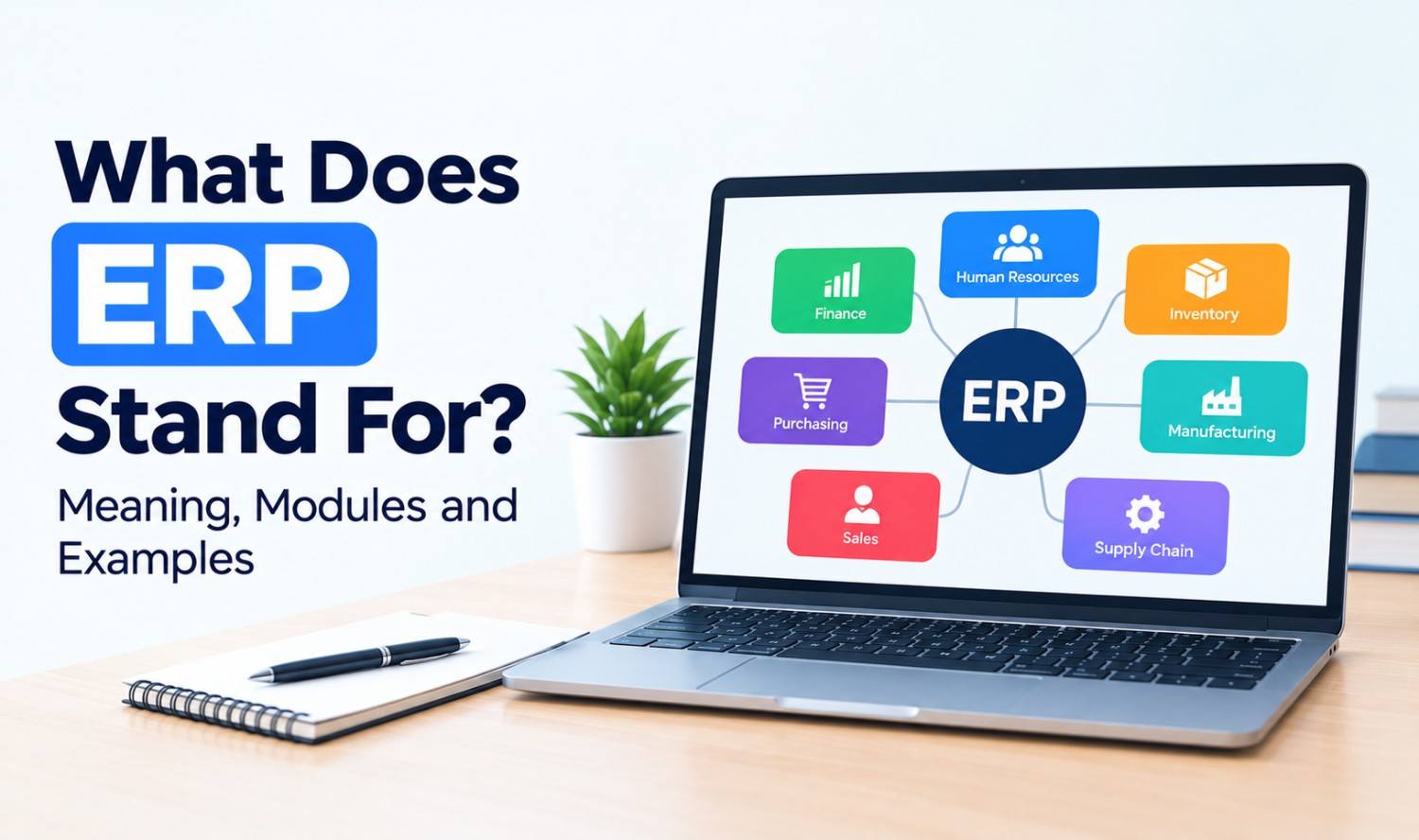

ERP stands for enterprise resource planning. It’s a type of business software that connects your core operations, such as finance, inventory, purchasing, sales and HR, in one shared system. Instead of each team keeping its own spreadsheets, everyone works from the same up-to-date data.
If you’ve heard the term in a meeting or a software demo and nodded along, you’re not alone. This guide explains the ERP meaning in plain English, how ERP systems work, the main modules, the different types, real examples and the other things ERP can stand for.
What Does ERP Stand For?
ERP stands for enterprise resource planning. “Enterprise” means the whole business, “resource” covers money, people, materials and equipment, and “planning” means managing how those resources are used. Together, the term describes software that helps a company run its daily operations from one connected system.
Oracle describes ERP as “a type of software that organizations use to manage day-to-day business activities.” Microsoft calls it “business management software that helps organizations integrate core processes.”
You’ll also see the term used in a few ways:
- ERP system: The full software platform a company runs.
- ERP software: The product itself, such as SAP or NetSuite.
- ERP solution: The software plus setup, data migration and support.
What Is an ERP System?
An ERP system is a business software platform that brings separate tasks like accounting, ordering, stock tracking and payroll into one place. Each department uses its own screens and tools, but all of them read from and write to the same database. That shared data is what makes an ERP different from a collection of separate apps.
Here’s a simple example. A customer places an order. In a business without ERP, sales enters it in one tool, the warehouse checks stock in a spreadsheet, and finance creates the invoice in accounting software. Each step needs manual updates.
With an ERP system, the order is entered once. Stock levels update automatically, the warehouse sees what to ship, and finance can invoice right away.
How Does ERP Work?
ERP works by storing all of a company’s key business data in one central database. Every module, from finance to inventory, uses that same data. When one team makes a change, such as recording a sale or receiving a shipment, the update shows up for every other team almost immediately.
This setup gives a business three big advantages:
- One version of the truth: Teams stop arguing over whose numbers are right.
- Less double entry: Data is entered once and reused across departments.
- Better visibility: Managers can see sales, stock and cash in real time.
Most ERP systems also include dashboards and reports, user permissions so people only see what they need, and workflows that route tasks like purchase approvals to the right person.
Common ERP Modules
ERP systems are built from modules, which are separate parts that handle specific business functions. Microsoft notes that “modern ERP software is often modular,” so companies can start with the modules they need and add more later. Finance and inventory are usually the first ones businesses adopt.
| Module | What It Handles |
|---|---|
| Finance and accounting | General ledger, invoicing, payables, receivables, reporting |
| Inventory management | Stock levels, warehouses, reorder points |
| Supply chain and procurement | Suppliers, purchase orders, shipping |
| Manufacturing | Production planning, bills of materials, work orders |
| Human resources | Employee records, payroll, time tracking |
| Sales and CRM | Quotes, orders, customer accounts |
| Project management | Budgets, timelines, resource planning |
| Reporting and analytics | Dashboards and business insights |
ERP vs Accounting Software vs CRM
ERP, accounting software and CRM are often confused, but they cover different ground. Accounting software manages money. CRM manages customer relationships and sales. ERP connects finance, operations, inventory and often sales in one system. Many ERP systems include accounting and basic CRM features, while standalone tools go deeper in one area.
| Accounting Software | CRM | ERP | |
|---|---|---|---|
| Main focus | Money in and out | Customers and sales | Whole-business operations |
| Typical users | Finance team, bookkeepers | Sales, marketing, support | Every department |
| Covers inventory? | Basic or none | No | Yes |
| Best for | Small businesses | Growing sales teams | Businesses with complex operations |
ERP and CRM are both types of enterprise applications. Our guide to the enterprise application platform explains how these systems are built, run and connected.
Types of ERP Systems
ERP systems mainly differ in where they run and who they’re built for. Cloud ERP runs on the vendor’s servers and is accessed online. On-premise ERP runs on servers your company owns. Some vendors build general ERP for any business, while others focus on one industry, such as manufacturing or retail.
| Type | How It Works | Good For |
|---|---|---|
| Cloud ERP | Hosted by the vendor, accessed through a browser, usually billed by subscription | Most new buyers who want faster setup |
| On-premise ERP | Installed on your own servers and managed by your IT team | Companies with strict data control needs |
| Hybrid ERP | Some parts in the cloud, others on-premise | Companies moving to the cloud in stages |
| Industry-specific ERP | Built for one sector’s processes | Manufacturers, distributors, retailers |
A Brief History of ERP
ERP grew out of manufacturing software. In the 1960s, companies started using material requirements planning (MRP) systems to plan the materials needed for production. Manufacturing resource planning (MRP II) followed in the 1980s. By 1990, research firm Gartner had coined the term “enterprise resource planning,” according to NetSuite.
Key milestones:
- 1964: Black & Decker became the first company to adopt an MRP solution, according to Oracle.
- 1983: MRP II was developed, adding more planning functions.
- 1990: Gartner coined the term ERP.
- 1998: NetSuite offered the first cloud ERP.
Today, many ERP vendors are adding AI features, such as forecasting and automated data entry.
Benefits and Challenges of ERP
The main benefits of ERP are connected data, less manual work, clearer reporting and easier growth. The main challenges are cost, time and change management. ERP projects touch every department, so they need careful planning, clean data and strong support from leadership to succeed.
Benefits:
- Connected data: Every team works from the same information.
- Less manual work: Fewer spreadsheets and repeated data entry.
- Faster reporting: Real-time dashboards replace month-end scrambles.
- Room to grow: Add users, locations and modules as you expand.
Challenges:
- Upfront cost: Licenses, setup and data migration add up.
- Time to implement: Large rollouts can take a long time.
- Change management: Staff need training and new habits.
Large projects carry real risk. In a 2010 report, the US Government Accountability Office found that six of nine Department of Defense ERP programs had schedule delays of 2 to 12 years. Five reported cost increases ranging from $530 million to $2.4 billion (GAO-11-53).
Examples of ERP Software
Well-known examples of ERP software include SAP S/4HANA, Oracle NetSuite, Microsoft Dynamics 365 and Odoo. Some are aimed at large global companies, while others suit small and midsize businesses. The right fit depends on your industry, size, budget and the systems you already use.
| ERP Software | Vendor | Notes |
|---|---|---|
| SAP S/4HANA | SAP | SAP’s ERP suite for large and midsize enterprises |
| Oracle NetSuite | Oracle | Cloud ERP, launched in 1998 as the first cloud ERP |
| Microsoft Dynamics 365 | Microsoft | Modular business apps covering finance, supply chain and more |
| Odoo | Odoo | Open source, with a free Community edition |
These are examples only, not recommendations. Compare features, pricing and support for your own needs.
Who Needs an ERP System?
A business usually needs an ERP system when separate tools and spreadsheets start slowing it down. Common signs include duplicate data entry, inventory errors, slow month-end closes and no clear view of the business. Many small businesses start with accounting software and add ERP as operations grow more complex.
Signs you may be ready:
- Too many spreadsheets: Key data lives in files only one person understands.
- Stock surprises: You often run out of items or overorder.
- Slow reporting: Getting basic numbers takes days.
- Growth pains: New locations, products or channels are hard to manage.
ERP, Automation and AI
ERP holds a company’s most important data, which makes it a natural hub for automation and AI. Workflow automation can move data between your ERP and other apps, while AI agents can answer questions, draft purchase orders or flag problems using ERP data, all with the right permissions in place.
Common examples include syncing orders from an online store into the ERP, sending low-stock alerts to a team chat, and letting staff ask a chatbot about order status. If your ERP doesn’t connect easily to the rest of your tools, workflow automation can close that gap without replacing the system.
Other Meanings of ERP
Outside business software, ERP has a few other common meanings. In mental health, it stands for exposure and response prevention, a therapy for OCD. In radio engineering, it means effective radiated power. In Singapore, ERP refers to Electronic Road Pricing, a road toll system that helps manage traffic.
| Meaning | Field | What It Is |
|---|---|---|
| Exposure and response prevention | Mental health | A type of cognitive behavioral therapy used to treat OCD, per the International OCD Foundation |
| Effective radiated power | Radio and telecom | A measure of a transmitter’s power that factors in antenna gain, defined in FCC rules |
| Electronic Road Pricing | Transportation (Singapore) | Charges drivers a fee when they pass ERP gantries during operating hours |
In most business and tech conversations, though, ERP means enterprise resource planning.
Frequently Asked Questions
What does ERP stand for in business?
In business, ERP stands for enterprise resource planning. It’s software that connects finance, inventory, purchasing, sales and HR in one shared system.
What is an ERP system in simple terms?
An ERP system is one central program that different departments use to run the business. Everyone works from the same data, so information is entered once and shared everywhere.
Is ERP the same as accounting software?
No. Accounting software manages finances. ERP includes accounting but also covers inventory, supply chain, HR, sales and other operations.
What is an example of ERP?
Common examples include SAP S/4HANA, Oracle NetSuite, Microsoft Dynamics 365 and Odoo.
What is cloud ERP?
Cloud ERP is ERP software hosted by the vendor and accessed over the internet, usually through a subscription. NetSuite offered the first cloud ERP in 1998.
How long does ERP implementation take?
It depends on company size, the number of modules, data quality and how much customization is needed. Small cloud setups move faster than large, multi-site rollouts.
Do small businesses need ERP?
Not always. Many start with accounting software. ERP becomes useful when spreadsheets, inventory problems or growth make separate tools hard to manage.