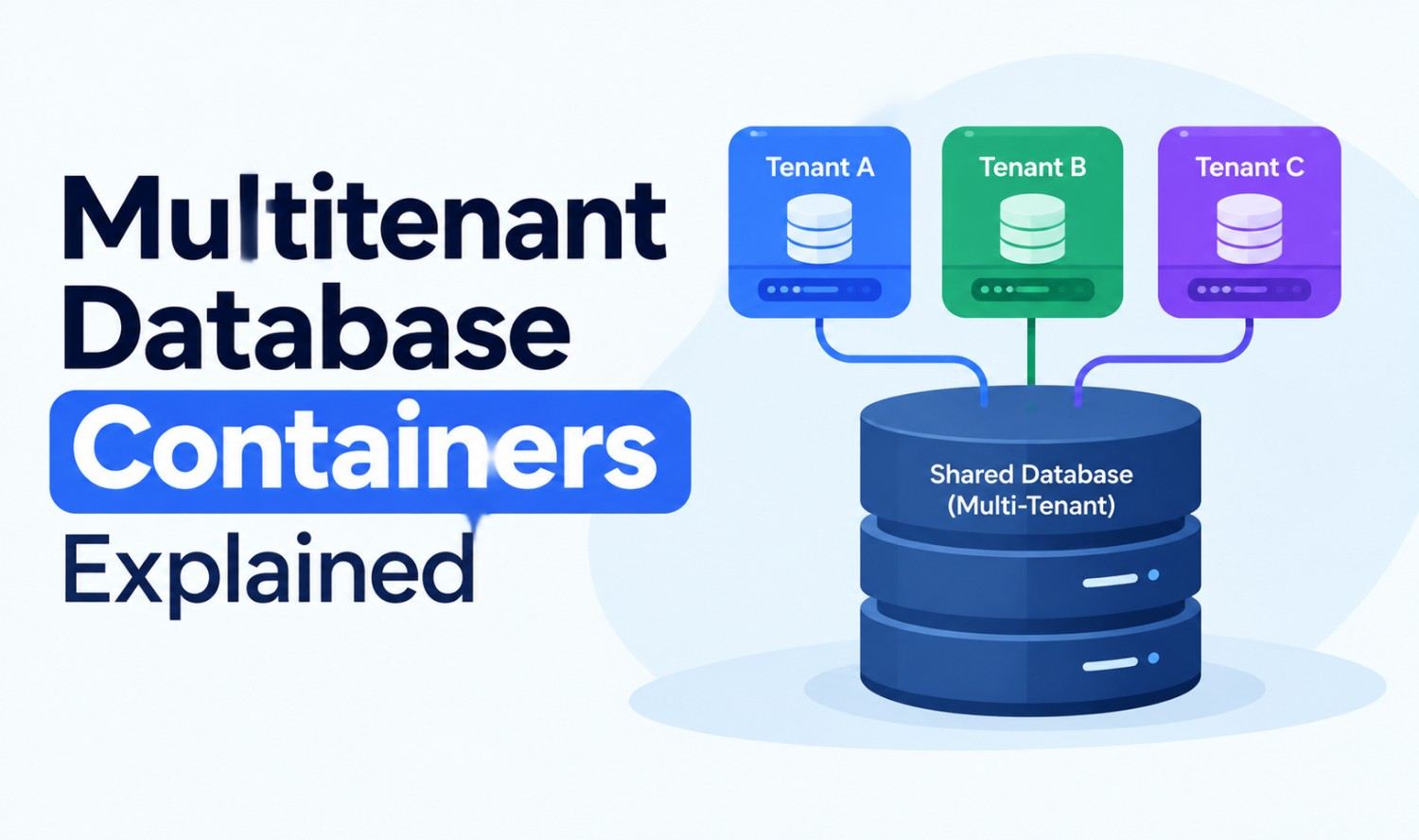

Multitenant database containers let one database system host several separate databases, called tenants, at the same time. Each tenant keeps its own data and users, while all tenants share the same software, memory and hardware. The term comes from SAP HANA, but Oracle, cloud databases and Kubernetes setups use similar ideas.
Think of it like an office building. Every company has its own locked office, but they all share the same lobby, elevators and power supply. This guide explains how that model works in SAP HANA and Oracle, how SaaS apps choose a tenancy model, and where containerized databases fit in.
Key Takeaways
- One system, many tenants: Several isolated databases run inside one database system.
- SAP HANA: One system database manages any number of tenant databases.
- Oracle: A container database (CDB) holds pluggable databases (PDBs).
- SaaS trade-off: More sharing lowers cost but reduces isolation.
- Kubernetes is different: “Containerized database” usually means running a database in software containers.
What Are Multitenant Database Containers?
Multitenant database containers are separate databases that live inside one shared database system. Each tenant has its own data, users and settings, so tenants can’t see each other’s information. The shared system handles memory, processing and administration, which makes it cheaper and simpler than running many fully separate database servers.
The phrase is used in three different ways, which causes a lot of confusion:
| Meaning | Where It’s Used | What “Container” Means |
|---|---|---|
| Multitenant database containers (MDC) | SAP HANA | A tenant database inside one SAP HANA system |
| Container database (CDB) | Oracle Database | The parent database that holds pluggable databases |
| Containerized database | Docker and Kubernetes | A database running inside a software container |
The first two are true multitenant database designs. The third is a way of packaging and running databases, which teams often use to build multi-tenant apps.
How Do Multitenant Database Containers Work in SAP HANA?
In SAP HANA, a multitenant system has exactly one system database and one or more tenant databases. The system database handles administration for the whole system, while each tenant database holds its own application data. SAP added support for multiple tenant databases for production use in SAP HANA SPS09.
SAP describes the system database as the part that stores system-wide information and “provides system-wide configuration and monitoring.” Administrators use it to create, drop, start and stop tenant databases.
Each tenant database has its own database users, catalog, repository and persistence, which means separate data and log files. SAP’s training material says tenants are “by default, isolated from each other in terms of application data and user management.”
Key facts about SAP HANA multitenancy:
- Only mode in SAP HANA 2.0: As of SAP HANA 2.0 SPS 01, “the multi-container database mode is the only database mode.”
- Creating tenants: Tenants are created from the system database with a CREATE DATABASE SQL statement, which is only available in the system database.
- Backups: Each tenant can be backed up and recovered on its own.
- Resource limits: Administrators can set memory and CPU limits for each tenant.
What Is High Isolation in SAP HANA?
By default, all database processes in a SAP HANA multitenant system run under one operating system user. For stronger protection, SAP supports high isolation, where each tenant’s processes run under its own dedicated operating system users and groups. It’s like giving each office its own keycard system, not just its own door.
You can learn more in SAP’s training on tenant databases.
How Does Oracle Multitenant Work?
Oracle Multitenant uses a container database (CDB) that holds one or more pluggable databases (PDBs). Each PDB looks like a separate database to applications, but all PDBs share the CDB’s memory and background processes. Starting with Oracle Database 21c, a multitenant container database is the only supported architecture.
Oracle’s documentation breaks the structure into a few parts:
| Part | What Oracle Says |
|---|---|
| CDB root (CDB$ROOT) | “A collection of schemas, schema objects, and nonschema objects to which all PDBs belong” |
| Seed PDB (PDB$SEED) | “A system-supplied template that the CDB can use to create new PDBs” |
| PDB | A user-created set of schemas and objects that “appears logically to a client application as a separate database” |
| Application container | An optional component that stores data and metadata for one or more application back ends |
Every CDB has one and only one root, and you can’t change the seed. Think of the seed as a blank office layout that’s copied each time a new tenant moves in.
Oracle also changed its licensing rules. Starting with Oracle Database 19c, it supports “up to 3 pluggable databases (PDBs) per container database (CDB) without requiring additional multitenant license.” Teams that need more PDBs should check Oracle’s current licensing terms.
See Oracle’s guide to CDBs and PDBs for the full details.
What Multitenancy Models Do SaaS Apps Use?
SaaS apps usually choose between three tenancy models: a separate app and database for each tenant, a separate database per tenant with a shared app, or many tenants sharing one database. Each step toward sharing lowers cost per tenant but reduces isolation. Microsoft’s Azure SQL guidance compares these trade-offs clearly.
| Model | Tenant Isolation | Cost per Tenant | Scale (Microsoft’s Estimate) |
|---|---|---|---|
| Standalone app, single-tenant database | High | High, sized for peaks | Medium (1 to 100s) |
| Multi-tenant app, database per tenant | High | Low, with elastic pools | High (1 to 100,000s) |
| Sharded multitenant databases | Low | Lowest for small tenants | Unlimited (1 to 1,000,000s) |
Microsoft says the standalone model “provides the greatest database isolation” but is “the most expensive solution.” A multitenant database “necessarily sacrifices tenant isolation” and carries “an increased risk of encountering noisy neighbors.” In return, multitenant databases “have the lowest per-tenant cost.”
Many teams also use schema-per-tenant designs, where tenants share a database but each gets its own schema. It sits between the database-per-tenant and shared-table approaches.
Read Microsoft’s SaaS tenancy patterns for a deeper comparison.
How Do Containerized Databases Fit In?
A containerized database runs inside a software container, such as a Docker container, often managed by Kubernetes. It isn’t the same as SAP HANA or Oracle multitenancy. Instead, it’s a way to package and run databases, and teams often use it to give each tenant its own database instance in a multi-tenant app.
In Kubernetes, databases are usually run with a StatefulSet. The Kubernetes documentation says a StatefulSet “runs a group of Pods, and maintains a sticky identity for each of those Pods,” which is useful for “applications that need persistent storage or a stable, unique network identity.”
Common ways teams use containerized databases for multitenancy:
- One container per tenant: Each tenant gets its own database instance.
- Shared container, separate schemas: One database instance serves many tenants.
- Namespaces per tenant: Kubernetes namespaces separate each tenant’s resources.
Searches for “container database” or “container DB” can mean either Oracle’s CDB or a containerized database, so the context matters.
What Are the Benefits of Multitenant Database Containers?
The main benefits are lower costs, simpler administration and faster setup for new tenants. Because tenants share memory, processing and software, you don’t need a separate server for every customer or team. Updates and monitoring can also happen in one place instead of across dozens of separate systems.
- Lower cost: Shared hardware and software reduce the cost of each tenant.
- Central management: Administrators manage many tenants from one system database or CDB.
- Faster tenant setup: SAP creates tenants with one SQL statement, and Oracle can create PDBs from its seed template.
- Per-tenant backups: SAP HANA lets you back up and recover each tenant separately.
- Resource control: SAP HANA lets you set memory and CPU limits per tenant.
What Challenges Should You Plan For?
The biggest challenges are noisy neighbors, shared upgrades and more complex restores. When tenants share resources, one busy tenant can slow down others. Upgrades to the shared system affect every tenant at once, and restoring one tenant’s data can be harder in highly shared designs.
Noisy Neighbors
Microsoft warns that in a shared multitenant database, “the workload of one overactive tenant affects the performance experience of other tenants.” Resource limits per tenant, like those in SAP HANA, help reduce this risk.
Shared Upgrades
When all tenants run on one system, upgrading the system usually upgrades everyone together. That makes it harder to give one tenant a different version or schedule.
Restore Complexity
Restoring a single tenant is simpler when each tenant has its own database. In shared-table designs, you may need to recover specific rows instead of a whole database.
How Do You Keep Tenants Secure and Isolated?
You keep tenants secure by isolating their data, users and processes, and by limiting what each tenant can access. Built-in features help: SAP HANA isolates tenants by default and offers high isolation, while shared-table designs can use row-level security. Regular access reviews and per-tenant encryption add another layer.
Practical security steps:
- Use the strongest isolation you can afford: Separate databases give stronger isolation than shared tables.
- Turn on high isolation in SAP HANA: Run each tenant’s processes under its own operating system users.
- Use row-level security for shared tables: PostgreSQL’s row security policies “restrict, on a per-user basis, which rows can be returned by normal queries.”
- Limit admin access: Keep system-level access, such as the SAP system database or Oracle root, to a small group.
- Test restores: Make sure you can recover one tenant without affecting others.
How Do You Choose the Right Approach?
Choose based on how much isolation your tenants need, how many tenants you expect and your budget. Regulated customers often need separate databases, while large numbers of small tenants usually fit shared models. If you already run SAP HANA or Oracle, their built-in multitenancy is often the simplest starting point.
| If You Need | Consider |
|---|---|
| Strongest isolation for a few large customers | Database per tenant or standalone databases |
| Thousands of small tenants at low cost | Shared or sharded multitenant databases |
| A middle ground | Schema per tenant |
| You already run SAP HANA 2.0 | Tenant databases (always multitenant) |
| You already run Oracle 21c or later | CDB with PDBs (the only supported architecture) |
| Flexible deployment for many instances | Containerized databases on Kubernetes |
If you’re planning a multi-tenant SaaS platform, our custom software development services help US businesses design database architecture that balances cost, security and growth.
Frequently Asked Questions
What are multitenant database containers?
They’re separate tenant databases that run inside one shared database system. Each tenant keeps its own data and users, while the tenants share the system’s memory, processing and administration.
What is MDC in SAP HANA?
MDC stands for multitenant database containers. In SAP HANA, one system database manages one or more tenant databases. As of SAP HANA 2.0 SPS 01, this is the only database mode.
What is the difference between a CDB and a PDB in Oracle?
A container database (CDB) is the parent database that holds the root, the seed and pluggable databases. A pluggable database (PDB) appears to applications as a separate database inside the CDB.
Is a containerized database the same as a multitenant database?
No. A containerized database runs inside a software container, such as Docker, often managed by Kubernetes. A multitenant database hosts several tenants in one system, like SAP HANA tenants or Oracle PDBs.
Are multitenant databases secure?
They can be. SAP HANA isolates tenants by default and offers high isolation, and shared-table designs can use row-level security. Separate databases per tenant give the strongest isolation.
Can you back up a single tenant database?
Yes, in SAP HANA each tenant database can be backed up and recovered on its own. In shared-table designs, restoring one tenant is more complex.
What is the noisy neighbor problem?
It happens when one busy tenant uses so many shared resources that other tenants slow down. Per-tenant resource limits and separate databases help reduce it.