
Application Acceleration Manager: What It Is and Uses Today
An application acceleration manager is a system that sits between users and application servers and makes apps load and respond faster. It combines techniques like caching, compression, TCP optimization, SSL offload and load balancing, then manages them from one place. The term became popular through F5’s BIG-IP Application Acceleration Manager (AAM), launched in 2013. Today, the same ideas live on in CDNs, application delivery controllers, cloud load balancers and SASE platforms. This guide explains what an application acceleration manager does, how each technique works, how it compares to WAN acceleration and what to use now. What Is an Application Acceleration Manager? An application acceleration manager is software, a virtual appliance or a hardware device that speeds up how applications are delivered over a network. Every request passes through it. It decides how to serve each response fastest, using cached content, smaller files, tuned connections and offloaded encryption, so users wait less and servers work less. Think of it as a traffic controller and a pantry in one. Instead of sending every request back to the kitchen (your server), it hands out ready-made items it already has, packs orders tighter and keeps the roads clear. Most application acceleration managers handle a mix of these jobs: The word “manager” matters. A single accelerator might do one of these things. A manager bundles several and gives you one place to set policies, monitor results and tune performance. Where the Term Comes From: F5 BIG-IP AAM The phrase “application acceleration manager” is closely tied to F5. On May 21, 2013, F5 announced BIG-IP Application Acceleration Manager, a module that combined features from its BIG-IP WebAccelerator and BIG-IP WAN Optimization Manager products. F5 has since published a support notice announcing the end of software development for BIG-IP AAM. According to F5’s 2013 announcement, BIG-IP AAM was offered as an add-on module and as a standalone product. It aimed to replace separate point solutions for web performance, WAN optimization and video delivery. Launch features included: F5 later published K70113407, “End of Software Development for BIG-IP AAM.” If you still run AAM, check that article and F5’s support policy for the dates that apply to your software version before planning upgrades. So when people search for an application acceleration manager today, they usually mean one of two things: the F5 product, or the general category of tools that speed up application delivery. The rest of this guide covers both. How Does Application Acceleration Work? Application acceleration works by removing delay at each step between the user and the server. It cuts the number of round trips, shrinks the data sent, serves repeat content from nearby caches and moves heavy work like encryption off the application servers. Each technique saves a little time, and together they add up. Caching Caching stores copies of frequently requested content, such as images, scripts and common pages. When the next user asks for the same item, the cache serves it right away. The server doesn’t rebuild the page, and the data often travels a shorter distance. Compression Compression shrinks text-based files like HTML, CSS, JavaScript and JSON before sending them. Smaller files reach users faster, especially on slow or mobile connections. Most modern setups use gzip or Brotli. TCP and Protocol Optimization Standard TCP has limits on long, busy links. Its window field is 16 bits, which caps the receive window at 64 KiB. The Window Scale option defined in RFC 7323 allows much larger windows, up to 1 GiB. Acceleration tools tune settings like this to keep more data moving on high-latency connections. Newer protocols help too. HTTP/2 sends many requests over one connection. HTTP/3, standardized in 2022 as RFC 9114, runs HTTP over QUIC instead of TCP, which reduces setup delays and handles packet loss better. SSL/TLS Offload Encrypting and decrypting traffic takes processing power. An acceleration manager can handle TLS at the edge, so application servers spend their resources on business logic instead. Connection Reuse Opening a new connection for every request adds handshakes and delay. Connection reuse keeps connections open and shares them across requests, which cuts round trips. Load Balancing Load balancing spreads incoming requests across several servers. No single server gets overloaded during traffic spikes, and users get faster, steadier responses. Application Accelerator vs Application Acceleration Manager An application accelerator is usually a single tool or technique that speeds up one part of delivery, like a cache or a compression engine. An application acceleration manager bundles several accelerators together and controls them from one place, with shared policies, monitoring and reporting across all the applications it serves. Application Accelerator Application Acceleration Manager Scope One technique or task Several techniques together Control Configured on its own Central policies and dashboards Example A web cache or web application accelerator F5 BIG-IP AAM, or an ADC with acceleration features Best for Fixing one specific bottleneck Managing performance across many apps Application Acceleration vs WAN Acceleration and Other Tools WAN acceleration speeds up traffic on the wide area network links between offices, data centers and remote sites. Application acceleration focuses on how fast a specific app loads and responds for users. The two overlap, and products like F5 AAM combined them, but they solve different problems and are often sold separately. Here’s how the main speed tools compare: Tool Main Focus Typical Location Application acceleration manager App response time for users In front of app servers WAN accelerator or WAN acceleration appliance Throughput between sites At both ends of a WAN link Application delivery controller (ADC) Load balancing, TLS, traffic rules Data center or cloud Content delivery network (CDN) Serving content close to users Global edge servers SD-WAN and SASE Routing and securing branch and remote traffic Network edge and cloud Network acceleration is the broadest term. It covers any method that speeds up data across a network, while WAN acceleration targets long-distance links specifically. Benefits and Limitations The main benefits of an application acceleration manager are faster load times, less server strain and better scaling during traffic spikes.
What Does ERP Stand For? Meaning, Modules and Examples
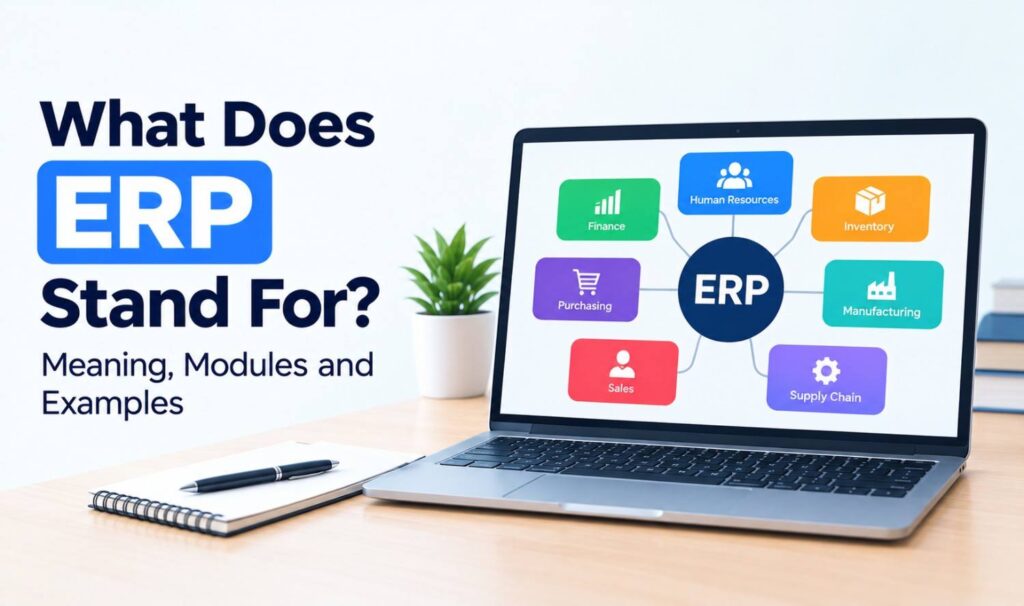
ERP stands for enterprise resource planning. It’s a type of business software that connects your core operations, such as finance, inventory, purchasing, sales and HR, in one shared system. Instead of each team keeping its own spreadsheets, everyone works from the same up-to-date data. If you’ve heard the term in a meeting or a software demo and nodded along, you’re not alone. This guide explains the ERP meaning in plain English, how ERP systems work, the main modules, the different types, real examples and the other things ERP can stand for. What Does ERP Stand For? ERP stands for enterprise resource planning. “Enterprise” means the whole business, “resource” covers money, people, materials and equipment, and “planning” means managing how those resources are used. Together, the term describes software that helps a company run its daily operations from one connected system. Oracle describes ERP as “a type of software that organizations use to manage day-to-day business activities.” Microsoft calls it “business management software that helps organizations integrate core processes.” You’ll also see the term used in a few ways: What Is an ERP System? An ERP system is a business software platform that brings separate tasks like accounting, ordering, stock tracking and payroll into one place. Each department uses its own screens and tools, but all of them read from and write to the same database. That shared data is what makes an ERP different from a collection of separate apps. Here’s a simple example. A customer places an order. In a business without ERP, sales enters it in one tool, the warehouse checks stock in a spreadsheet, and finance creates the invoice in accounting software. Each step needs manual updates. With an ERP system, the order is entered once. Stock levels update automatically, the warehouse sees what to ship, and finance can invoice right away. How Does ERP Work? ERP works by storing all of a company’s key business data in one central database. Every module, from finance to inventory, uses that same data. When one team makes a change, such as recording a sale or receiving a shipment, the update shows up for every other team almost immediately. This setup gives a business three big advantages: Most ERP systems also include dashboards and reports, user permissions so people only see what they need, and workflows that route tasks like purchase approvals to the right person. Common ERP Modules ERP systems are built from modules, which are separate parts that handle specific business functions. Microsoft notes that “modern ERP software is often modular,” so companies can start with the modules they need and add more later. Finance and inventory are usually the first ones businesses adopt. Module What It Handles Finance and accounting General ledger, invoicing, payables, receivables, reporting Inventory management Stock levels, warehouses, reorder points Supply chain and procurement Suppliers, purchase orders, shipping Manufacturing Production planning, bills of materials, work orders Human resources Employee records, payroll, time tracking Sales and CRM Quotes, orders, customer accounts Project management Budgets, timelines, resource planning Reporting and analytics Dashboards and business insights ERP vs Accounting Software vs CRM ERP, accounting software and CRM are often confused, but they cover different ground. Accounting software manages money. CRM manages customer relationships and sales. ERP connects finance, operations, inventory and often sales in one system. Many ERP systems include accounting and basic CRM features, while standalone tools go deeper in one area. Accounting Software CRM ERP Main focus Money in and out Customers and sales Whole-business operations Typical users Finance team, bookkeepers Sales, marketing, support Every department Covers inventory? Basic or none No Yes Best for Small businesses Growing sales teams Businesses with complex operations ERP and CRM are both types of enterprise applications. Our guide to the enterprise application platform explains how these systems are built, run and connected. Types of ERP Systems ERP systems mainly differ in where they run and who they’re built for. Cloud ERP runs on the vendor’s servers and is accessed online. On-premise ERP runs on servers your company owns. Some vendors build general ERP for any business, while others focus on one industry, such as manufacturing or retail. Type How It Works Good For Cloud ERP Hosted by the vendor, accessed through a browser, usually billed by subscription Most new buyers who want faster setup On-premise ERP Installed on your own servers and managed by your IT team Companies with strict data control needs Hybrid ERP Some parts in the cloud, others on-premise Companies moving to the cloud in stages Industry-specific ERP Built for one sector’s processes Manufacturers, distributors, retailers A Brief History of ERP ERP grew out of manufacturing software. In the 1960s, companies started using material requirements planning (MRP) systems to plan the materials needed for production. Manufacturing resource planning (MRP II) followed in the 1980s. By 1990, research firm Gartner had coined the term “enterprise resource planning,” according to NetSuite. Key milestones: Today, many ERP vendors are adding AI features, such as forecasting and automated data entry. Benefits and Challenges of ERP The main benefits of ERP are connected data, less manual work, clearer reporting and easier growth. The main challenges are cost, time and change management. ERP projects touch every department, so they need careful planning, clean data and strong support from leadership to succeed. Benefits: Challenges: Large projects carry real risk. In a 2010 report, the US Government Accountability Office found that six of nine Department of Defense ERP programs had schedule delays of 2 to 12 years. Five reported cost increases ranging from $530 million to $2.4 billion (GAO-11-53). Examples of ERP Software Well-known examples of ERP software include SAP S/4HANA, Oracle NetSuite, Microsoft Dynamics 365 and Odoo. Some are aimed at large global companies, while others suit small and midsize businesses. The right fit depends on your industry, size, budget and the systems you already use. ERP Software Vendor Notes SAP S/4HANA SAP SAP’s ERP suite for large and midsize enterprises Oracle NetSuite Oracle Cloud ERP, launched in 1998 as the
Multipoint Control Unit (MCU): How It Works in Video Calls
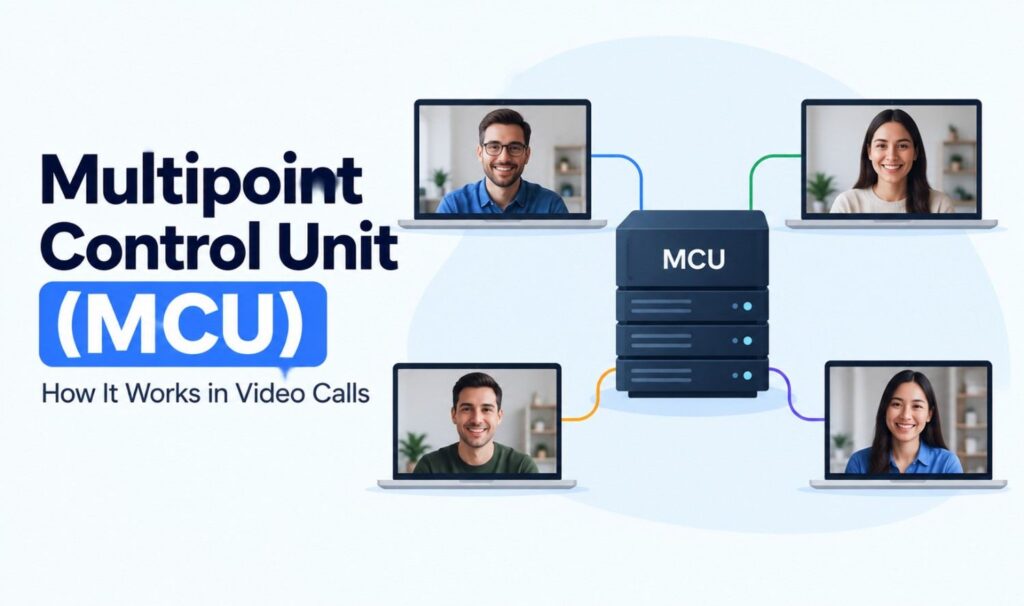
What is a multipoint control unit (MCU)? Learn how an MCU works, its core functions, H.323 and SIP standards, MCU vs SFU vs mesh, and when you still need one.
Latest Breakthroughs in Quantum Computing 2024 and What Came Next
The latest breakthroughs in quantum computing 2024 delivered were about reliability, not size. Between 2024 and 2026, researchers proved that quantum errors can shrink as machines grow, built dozens of error-corrected “logical” qubits, and published the first carefully checked claims of quantum advantage. What hasn’t changed: quantum computers still can’t do everyday business work or crack modern encryption. Below, we walk through each year’s major results, rate how solid they are, and explain what they mean for US companies. Quantum Computing Timeline: 2024 to 2026 When What Happened Organization April 2024 Four logical qubits beat their own hardware’s error rate by 800x Microsoft, Quantinuum August 2024 First three post-quantum encryption standards published NIST November 2024 A 112-hour experiment rerun in 2.2 hours on the Heron processor IBM December 2024 Willow chip runs error correction “below threshold” Google February 2025 Majorana 1 topological chip unveiled Microsoft February 2025 Ocelot cat-qubit prototype unveiled AWS September 2025 Record array of 6,100 atom qubits Caltech October 2025 Quantum Echoes algorithm beats a classical method by 13,000x Google October 2025 Nobel Prize in Physics for superconducting circuit research Clarke, Devoret, Martinis November 2025 Helios launches with 98 qubits Quantinuum July 2026 Verified advantage claim on 70 logical qubits IBM, University of Chicago September 2026 Theory for operations over 1,000x faster Chalmers University October 2026 Six companies now in DARPA’s final evaluation stage DARPA Quantum Computing Basics You Need First A qubit is the quantum version of a computer bit, and unlike a normal bit, it can hold a mix of 0 and 1 at once. That property lets quantum computers attack certain problems in new ways. The downside is fragility: the slightest heat or vibration scrambles a qubit and introduces errors. Four terms come up again and again: Term Plain-English Meaning Physical qubit A single real piece of quantum hardware, such as one trapped atom Logical qubit A dependable qubit made by combining many physical qubits so mistakes can be caught and fixed Error correction The process that turns noisy physical qubits into fewer, trustworthy logical ones Fault tolerance The stage where a machine fixes errors faster than they pile up, so long programs can finish So how big does a useful quantum computer need to be? It depends on the task. Google estimated in May 2025 that cracking 2048-bit RSA encryption would take roughly one million noisy physical qubits running for a week, a 20x drop from its 2019 estimate. Machines with comparable error rates today have about 100 to 1,000 qubits. For scientific simulation, IBM’s 2029 Starling system aims for 200 logical qubits running 100 million operations. A 4-Point Reality Check for Any Quantum Headline Before believing a quantum announcement, check four things. Most hype collapses under at least one of them. We use these four checks throughout the rest of this guide. Latest Breakthroughs in Quantum Computing 2024: Error Correction Finally Works Until 2024, every qubit added to a machine also added more errors. That year, several teams showed the opposite could happen, which is the foundation every future quantum computer depends on. Google Willow: Errors Fall as the Chip Grows Google announced Willow, a 105-qubit superconducting chip, on December 9, 2024. Google built logical qubits from 3×3, 5×5 and 7×7 grids of physical qubits, and the error rate halved at each larger size. Researchers had pursued this “below threshold” milestone for decades. Willow also completed a benchmark in under five minutes that Google estimates would take the Frontier supercomputer 10 septillion years. Google is clear that this particular benchmark has no known practical use. Reality check: Peer reviewed in Nature, fairly compared, and a genuine step forward for error correction. The speed headline matters far less than the error result. Logical Qubits Move From Theory to Hardware Several groups produced working logical qubits: Encryption Standards Arrive On August 13, 2024, NIST published its first three post-quantum encryption standards. This was not a hardware breakthrough, but it marked the moment quantum computing became a practical security planning issue for every US organization. More on that below. 2025: New Qubit Designs, Bigger Arrays and Faster Results 2025 brought a wave of new hardware approaches, each claiming a better path to reliable machines. Some are proven; others are still bets. Microsoft Majorana 1 In February 2025, Microsoft revealed Majorana 1, a chip using “topological” qubits that are meant to resist errors by design. Microsoft says it fit eight of these qubits on a chip built to eventually hold one million. Reality check: The readout results are published in Nature, but error correction has not yet been shown on the chip. The million-qubit figure is a design goal. This is the most contested hardware claim of the period. AWS Ocelot On February 27, 2025, AWS introduced Ocelot, a prototype using “cat qubits” that naturally block one common kind of error. AWS estimates the design could cut the cost of error correction by up to 90%. Reality check: A promising, peer-reviewed design, but a small prototype with five data qubits. The 90% figure is an AWS projection. Caltech’s 6,100-Atom Array In September 2025, Caltech researchers held 6,100 cesium atoms in place with 12,000 laser “tweezers,” a record for this type of system. The atoms kept their quantum state for about 13 seconds, with 99.98% accuracy on single-qubit operations. Reality check: Impressive scale, but the atoms were not yet linked together or error corrected. It shows the size is achievable, not that a full computer works at that size. Neutral-Atom Machines Head to Customers Atom-based systems began moving beyond research labs: Google Quantum Echoes In October 2025, Google reported that its Quantum Echoes algorithm ran 13,000 times faster on Willow than the best classical algorithm on a leading supercomputer. Google calls it “verifiable” because another quantum computer of similar quality could reproduce the answer. Quantinuum Helios Quantinuum launched Helios on November 5, 2025. It has 98 trapped-ion qubits and produced 48 fully error-corrected logical qubits at a ratio of just two physical qubits per logical qubit.